
HubbuyCN Spreadsheet · buying guide
From a product link to a parcel you can identify.
A useful buying guide follows the handover at every stage: seller listing, purchase order, warehouse item and international parcel.
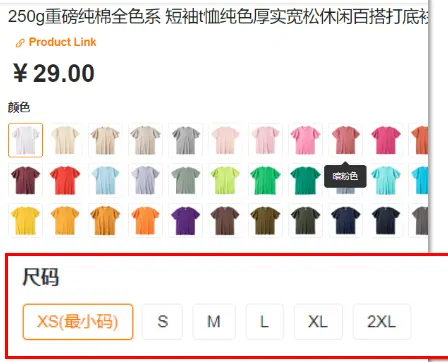
1. Save the exact listing and selected option.
Open the seller page behind the product card. Record the original link, product title, seller name, colour, size, quantity and any separate domestic delivery charge. A card photograph can show several colours while its starting price applies to only one. For a wholesale listing, also check the minimum quantity.
For example, if a T-shirt is listed in two fabric weights, “white, medium” is incomplete. Save the fabric weight and variant label as well. If the agent cannot parse the URL, use the manual purchase entry and provide the same information rather than a screenshot with no link.
2. Confirm the service destination, then pay for purchasing.
The HubbuyCN Service Migration Notice archived on 9 October 2026 directs new ordering, payments, parcels and storage to HUBBUY. Start from the official entry and read the current notice. If the destination is blank or shows an error, pause before sending money; a successful HTTP response alone does not show that checkout works.
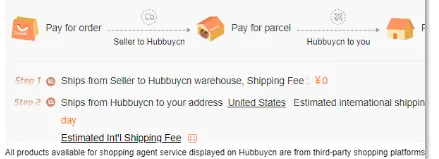
At the purchase stage, read the selected options and full payment breakdown. Record the account/order reference and what you authorised. With forwarding, you buy from the seller yourself, use the current account-specific warehouse address and register the seller tracking number. The reference code helps the warehouse match the delivery to your account.
3. Review each warehouse item before grouping it.
Check the received quantity, visible colour, model and size label against the saved order. Ordinary appearance checks do not establish material composition, authenticity, electrical function or fit. Request a specific detail while the item is accessible: “show the inside pocket” is clearer than “more QC”.
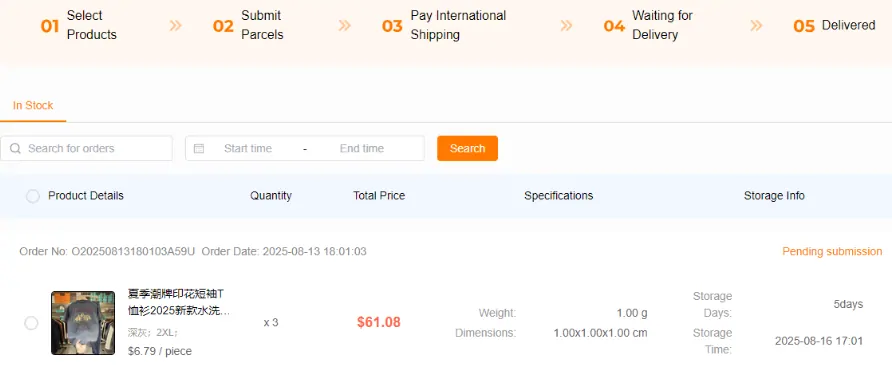
Keep a separate record for each seller order. If three items have arrived and one is still missing, compare the oldest item’s storage deadline with the expected arrival of the fourth. A later arrival does not restart the earlier item’s clock. Storage allowance and the seller’s return window answer different questions.
4. Select the parcel contents, then the route.
Verify the recipient, included item quantities, goods categories, declared descriptions and any requested packing service. Batteries, liquids or other restricted contents can change eligible routes. Compare the route using its actual weight/volume rules and coverage, not the first displayed price alone.
Payment may be based on an estimate; review the final packed measurements and any reconciliation before assuming the shipment is settled. Save the parcel/waybill number separately from the purchase order. Use shipping status and the current support channel for delivery issues.

Review costs, payment choices and parcel preparation →
Browse productsBuying guideRead warehouse photosCosts and shippingHelp and FAQ