Plan a search before opening the account
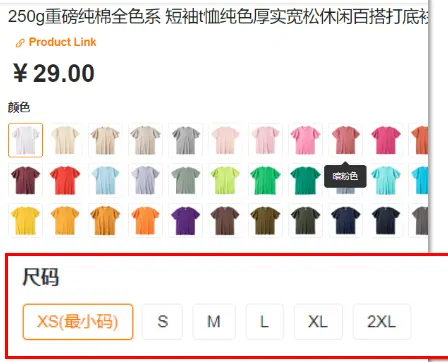
On 4 August 2026 we opened the HubbuyCN home page in a rendering browser, typed hoodie into the box and pressed enter. The page that came back was the sign in screen at the login address, with the redirect back to the home page attached to it. We repeated the run pressing only enter, with no button click, and got the same thing.
That is not a fault and it is not a trick. It is the shape of the platform: the box is advertising, the results are a member feature. What it means in practice is that everything on this page happens in one of two places, before the account or after it, and mixing them up is how people waste an evening.
Before the account, you can decide what you are actually searching for, what the item is called in plain marketplace wording, and what your ceiling is. After the account, you get a results page with source strips, four sorts and a filter column. This page covers the first part properly, then tells you exactly what the second part looks like from the official tutorial.

What the front page actually offers you
Three things sit on the public home page and all three are useful before you register. The search box carries the placeholder Enter product name/link, which is two different jobs in one field. There is a small picture icon inside the box for searching from an image. Underneath sit three category shortcuts, which on our run read Sports and Outdoors, Dresses, and Home and Kitchen.
Just above the box, in small type, the page states what it is actually selling in three stages: place order and payment, quality check and storage, then direct international shipping. That line is the fastest way to understand what an agent is, which is a warehouse and a shipping desk rather than a shop.

The tool
Work out which control to touch before you sign in
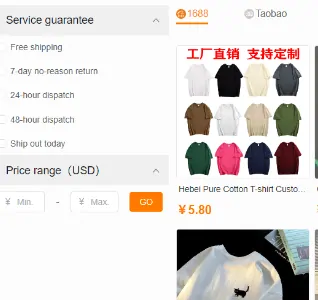
Pick the category, say what matters most on this one, choose which source strip you expect to buy from, and give a ceiling if you have one. The builder returns the sort to select, the filter to tick, what to type in the price range boxes and the one thing worth checking on that category before you commit.
Every sort name and filter name it gives back is copied from the official tutorial screenshots, so the words match what you will see once you are inside. The category advice is ours.
Four things worth doing before you make an account
None of these need a login, and each one removes a decision from the moment when you are staring at a results page with the shipping cost still unknown.
Name the item the boring way
Not the colourway nickname, not the community shorthand, not the model number from a forum. A hooded sweatshirt. A shoulder bag. A pair of running shoes. The boring noun is what the marketplace category tree is built on, and it is the part a machine translation gets right.
If you cannot name the thing plainly, that is the real blocker, and no search box fixes it.
Check whether somebody already found it
The HubbuyCN Spreadsheet exists because this step usually works. A card that is already on the catalogue is a link somebody has used, which beats a search that might return nothing. A catalogue can help you start with a descriptive seller link; check that it still opens and matches your selected variant.
Decide your ceiling in the currency the page shows
The tutorial screenshots show item prices in CNY while the price range boxes are labelled in USD. Knowing your own number before you look stops the exchange rate from doing your thinking for you.
The header on the public page carries a language and currency control, which read English and USD on our run.
Read the two rules that will bite you
The official tips say 1688 items carry a minimum order quantity, and that some goods have international posting restrictions. Both of those decide whether an item is buyable at all, and neither shows up in the price.
Three things you can put in that box, and what each one does
The placeholder says product name or link, and those behave nothing like each other. The picture icon is a third path with its own failure mode.
A link you already have
Pasting a marketplace link means no search happens at all. You have already chosen the listing, the seller and the variant, and the platform only has to fetch it. This is the path the catalogue is built for, and it is why a card with a working link is worth more than a clever search.
It is also the path with the fewest ways to end up with the wrong object.
A product name
The platform searches the Chinese marketplaces for you and gives back listings whose titles have been machine translated into English. The translation is what you read, the Chinese title is what was matched, and the two are not the same text. Plain category wording survives that trip. Brand nicknames usually do not.
A photograph
There is a picture icon inside the box. Image search on any marketplace returns things that look similar in a thumbnail, which is a different question from whether it is the same object. We could not test what it returns, because the results sit behind the same sign in as everything else.
Treat it as a way to find the category, then search properly with words.
Before the account and after it, side by side
We tested the signed out half ourselves. The signed in half is described from the official tutorial, which is the honest way round: we are not going to describe a screen we have not seen.
What matters here is that nothing in the left hand column is a lesser version of the right. Choosing the item, the wording and the budget is the part that decides whether the order goes well. The results page only narrows a pile that your wording has already produced.
One more thing sits on the signed in side and it is easy to miss: the freight calculator. On our run the calculation page rendered as a sign in screen with roughly sixty characters of text, so we cannot tell you what it asks for. Anyone who describes its fields without an account is guessing.
Wording
Nicknames that need translating into marketplace words
These are our own rewrites, aimed at the plain retail vocabulary a Chinese listing is written in. They are a starting point for the box, not magic words, and the right hand column is the reason each one works.
| What people type | What to search instead | Why the second one returns more |
|---|---|---|
| Batch code or factory nickname | The plain garment name plus the colour | Batch names are community shorthand. They exist in chat, not in seller titles. |
| Techwear cargos | Cargo trousers, then filter by colour | Style labels are western marketing. The listing is categorised as trousers. |
| Dunk low panda | Low top sneakers plus black and white | Colourway nicknames rarely survive into a machine translated title. |
| Vintage denim jacket | Denim jacket, then read the measurement table | Vintage describes a look, and the same look sits under several category words. |
| Airpods case cute | Earphone case plus the material you want | Adjectives translate badly. Materials and categories translate well. |
| Y2K baby tee | Short sleeve cropped t shirt | The cut is what the seller wrote down. The era name is not. |
The official pages behind this one
Everything above is our reading of these. Open them if you want the operator wording rather than ours.
The shopping guide
The eight step flow, the tutorial screenshots of the results page, and the tips about minimum order quantities and posting restrictions.
Read the official guideHubbuyCN officialThe Fill and Buy page
Where the service migration notice sits. This is the page that says new orders now belong on Hubbuy.
See the migration noticeAgent, new platformHubbuy, where orders happen now
The newer platform from the same operator. Registration, ordering, payment, parcel submission and storage all live here.
Open HubbuyWhat a good search settles, and what it does not
Worth being clear about, because the two get blurred and then people are surprised later.
A careful search does settle
- That the listing is the object you meant
- That the variant, the colour and the size you picked exist
- That the seller is selling single units rather than a wholesale lot
- That the item is not in an obviously restricted category
It does not settle
- Whether the seller is honest about quality
- What the international freight will cost, since that depends on weight and route
- Whether customs in your country will charge you
- Whether the photographs belong to this seller at all